
APIs (Application Programming Interfaces) are sets of rules that allow software components to communicate with each other. They provide standards for application data interchange, enabling developers to write code that accesses information from other programs or platforms. For instance, a weather app uses APIs to communicate with the weather bureau’s system, retrieving daily weather data to display updates to users.
Types of APIs
Public APIs Also known as open APIs, these are accessible to any developer. They enable the creation of applications or services that integrate with other platforms or systems.
Partner APIs Used for communication between two business partners, these APIs are built using REST principles, ensuring predictable URLs that facilitate data writing and retrieval.
Private APIs Intended for internal use within a company, private APIs are the most common type due to their quick development and lack of need for robustness required by public products.
Composite APIs This approach batches sequential API requests into a single call. Instead of multiple server round trips, a client makes one request with a chain of calls, receiving one response.

How APIs Work
APIs enable apps, systems, and devices to share information through a request-response pattern:
API Client The client sends a request to the API server, initiated by user action or external triggers.
API Request Components
- Endpoint: A URL providing access to a specific resource.
- Method: Indicates the action (GET, POST, PUT, DELETE).
- Parameters: Variables telling the endpoint what to do.
- Request Headers: Key-value pairs providing additional request information.
- Request Body: Contains the main data for creating, updating, or deleting content.
API Server Handles authentication, data validation, and data manipulation.
API Response Components
- Status Code: Indicates the result (e.g., 200 OK, 201 Created, 404 Not Found).
- Response Headers: Provide extra details about the response.
- Response Body: Includes the requested data or an error message.
APIs can be likened to a restaurant: the customer (user) tells the waiter (API client) their order, the waiter conveys this to the kitchen (API server), which prepares the food (data) and sends it back through the waiter to the customer.

Dig Deeper: Leveraging Jira for Business Development in Advertising Agencies
Common API Architectural Styles
REST The most popular for internet data transfer, where resources are accessed via endpoints and operations are performed using standard HTTP methods.
SOAP Uses XML for highly structured messages between client and server, common in enterprise environments with advanced security features.
GraphQL An open-source query language allowing clients to retrieve specific data through a single API endpoint, reducing the number of round trips.
Webhooks Event-driven architecture where requests are sent in response to triggers, like a payment being made, enabling event processing and action taking.
gRPC Originated by Google, gRPC allows clients to call server functions as local objects, facilitating communication in distributed systems.
API’s Contribution to More Structured and Useful Coding
APIs enhance coding practices through:
Modularity: Separating functionality into distinct services or modules.
Reusability: Allowing code reuse across applications and projects.
Abstraction: Hiding complex data processing logic, simplifying development.
Integration: Facilitating the incorporation of third-party services.
Standardization: Enforcing consistent access methods, aiding documentation and quality.
Scalability: Enabling system expansion with minimal core changes.
Security: Centralizing security management.
Efficiency: Optimizing communication and data exchange.
Documentation and Community: Providing extensive resources and support.
Postman’s Role in API Testing
Postman is essential for API testing, offering:
Simplified API Interaction: User-friendly interface for sending HTTP requests.
Automated Testing: JavaScript scripts for validating responses.
Environment and Variable Management: Managing environment-specific variables and configurations.
Collection Sharing and Collaboration: Exporting and sharing test cases for team consistency.
Comprehensive Test Reports: Generating detailed execution reports.
Integration with CI/CD Pipelines: Automated testing in software delivery processes.
Extensive Documentation and Community Support: Creating and publishing API documentation, with a large support community.
For organizations looking to fully integrate API testing with their development workflows, JIRA implementation consultants can help set up and optimize these processes within your project management and CI/CD environments.
Real-World Examples of APIs
Salesforce: Cloud-based CRM software offering numerous API resources for developers.
Notion: Note-taking app with API collections for task automation.
Discord: Social platform with APIs for customizing servers.
Pinterest: Image-sharing platform with APIs for site or application development.
DoorDash: Food delivery platform with APIs for logistics and fleet management.
JIRA API and Its Use Case
The JIRA REST API enables programmatic interaction with JIRA. It can be used to build apps, script interactions, and develop integrations. Examples include:
Create and Manage Issues: Adding tasks with specific details.
Update and Track Progress: Modifying existing issues and adding comments.
Retrieve Data: Fetching information for reports and analysis.
Automate Workflows: Setting up scripts for task automation.
Integrate with Other Tools: Connecting JIRA with project management tools and custom software solutions.
For organizations looking to leverage the full potential of JIRA through these capabilities, JIRA consulting and JIRA consulting services can provide the expertise needed to design and implement effective API-driven solutions.
Manage Users and Permissions: Handling users, groups, and permissions.
JIRA API Example
Atlassian offers fundamental templates for API connection, available in various programming languages including
- Forge
- Curl
- Node.js
- Java
- Python
- PHP
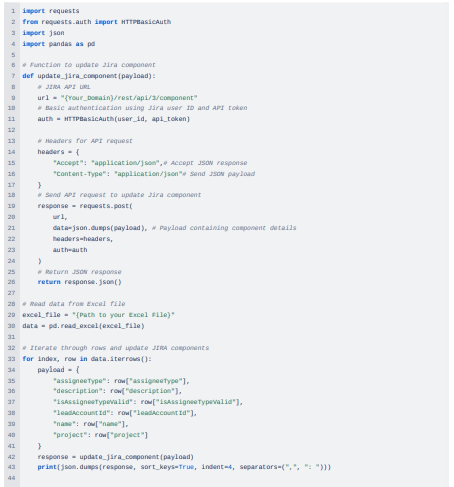
In this example, we’ll illustrate how to establish a connection with JIRA Cloud and update components by fetching data from an Excel sheet and updating it into a JIRA Cloud project.
Screenshot of an Excel sheet showing data with values of components that need updating in a JIRA Project.

Python code to update components in JIRA Cloud Project.
Conclusion
APIs are a powerful tool for extending Jira’s capabilities and integrating it seamlessly with other systems. By leveraging APIs, you can automate workflows, enhance data exchange, and create custom solutions tailored to your team’s needs. For organizations seeking to unlock the full potential of Jira through API integration, MicroGenesis, a leading digital transformation company and Atlassian partner, offers expert guidance. Our experienced consultants can help you design and implement API-driven solutions that enhance productivity and streamline operations. Trust MicroGenesis to be your partner in maximizing Jira’s power through innovative API usage.